SDD 09 - BMAD Method: Quick & Dirty Starter Guide
SDD Learning · Previous: OpenSpec lab route · Next: BMAD Method lab route
BMAD covers a wider stretch of software development than a single planning command: exploring an idea, defining requirements, recording architecture decisions, breaking work into stories and implementing a change. Its named skills and specialist roles help make those handoffs explicit.
The practical starting point is still small. Give one clear change to bmad-build. Add product planning and architecture work when the uncertainty or coordination problem calls for them.
Quick start
You need a coding agent with skill support, Node.js with npm, Git, Python and uv. The official first-change walkthrough specifies Node.js 20.12 or newer; use a supported Node.js release that also satisfies your coding tool.
From the project directory, run in the terminal:
$ npx skills add bmad-code-org/BMAD-METHOD
Choose your coding tool and the project installation scope. For the walkthrough below, select bmad, bmod-core-tools, bmod-method, bmad-build and bmad-ticket. If you also want the planning and review sections, include bmad-spec, bmad-project-context and bmad-code-review.
Open the coding agent in the same directory and ask:
Use the bmad skill to run bmad setup for this project. Then run bmad status and explain the installed modules, their versions and the output location.
This is an agent request: installing the skills does not put a standalone bmad executable on your shell PATH. Invoke skills using your tool's picker or supported syntax. The natural-language examples in this article avoid assuming one slash-command format across all agents.
The installation guide also documents plugin marketplace installation. Pick one installation route per skill to avoid duplicate copies.
Start with the work, then choose the process
| Situation | Smallest useful entry |
|---|---|
| A clear, bounded implementation change | bmad-build |
| You know the outcome but need a durable contract | bmad-spec, then build |
| The contract is too large for one build session | bmad-spec, bmad-ticket, then build each story |
| The product idea is still unclear | Idea exploration and research before the spec |
| Existing project instructions are missing or stale | bmad-project-context |
| You do not know which path fits | Ask bmad |
These are entry choices, not a requirement to complete every row. The planning-path guide makes a useful distinction: a spec records sufficiently defined intent; it cannot substitute for deciding what you want.
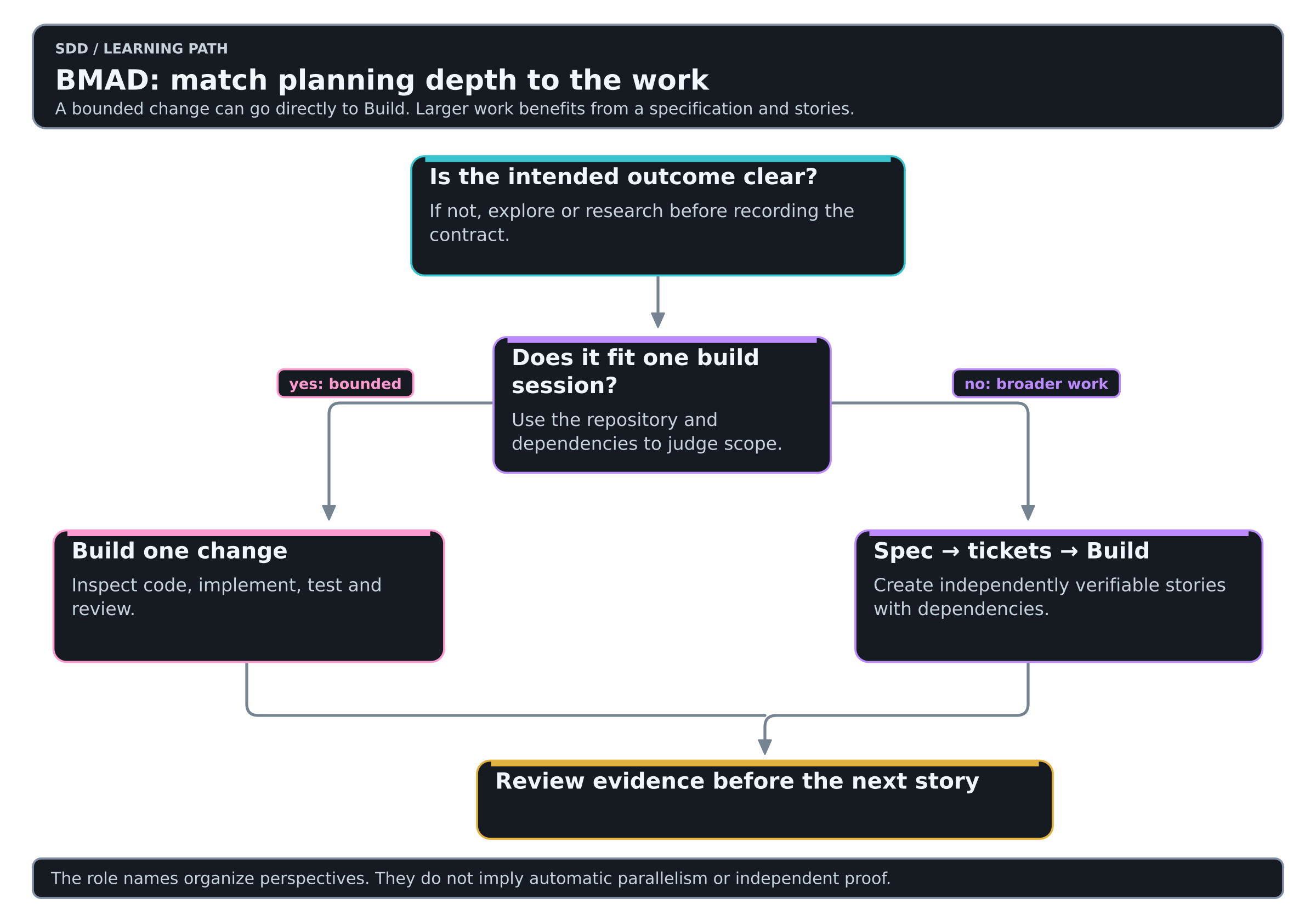
Colors mean the same thing in every diagram of this Learning: see the color key.
Roles are a way to focus reasoning
BMAD's current skills and agents reference includes Analyst, Product Manager, Architect, Developer and UX Designer roles. A role helps the agent approach a particular question; it does not guarantee an independently executing person or process.
| Perspective | Useful question |
|---|---|
| Analyst | What problem are we solving, and what evidence supports it? |
| Product manager | Which outcome, scope and acceptance criteria matter? |
| Architect | Which decisions must remain consistent across separately built parts? |
| Developer | What is the smallest working change that satisfies the contract? |
| UX designer | What experience should the user have when the feature changes? |
Use those perspectives when they expose different risks. A tiny command-line flag does not need five ceremonial interviews. A multi-team migration may need explicit ownership of all those questions except UX.
When the feature becomes larger
Imagine the next request adds JSON output, filtering, recursive discovery and a stable public schema. That is now several interacting decisions. Establish intent, then invoke the installed spec skill:
Use bmad-spec to record the agreed behavior and compatibility boundaries for the next CLI release. Separate decided requirements from unresolved questions. Do not implement or silently resolve product choices.
After reviewing the spec:
Use bmad-ticket to break the accepted spec into independently verifiable stories. Each story must include observable acceptance criteria and its dependencies. Prefer one useful behavior end-to-end over separate parser, output and test layers.
Give one ready story to bmad-build in a fresh session. Pass its artifact path or ticket reference. Do not rely on the new session remembering the earlier conversation.
An appropriate first story could be JSON output with compatibility tests. Recursive discovery can follow after its inclusion and error semantics are decided. A schema promise may require a separate compatibility decision before it is published to consumers.
Durable knowledge and project context
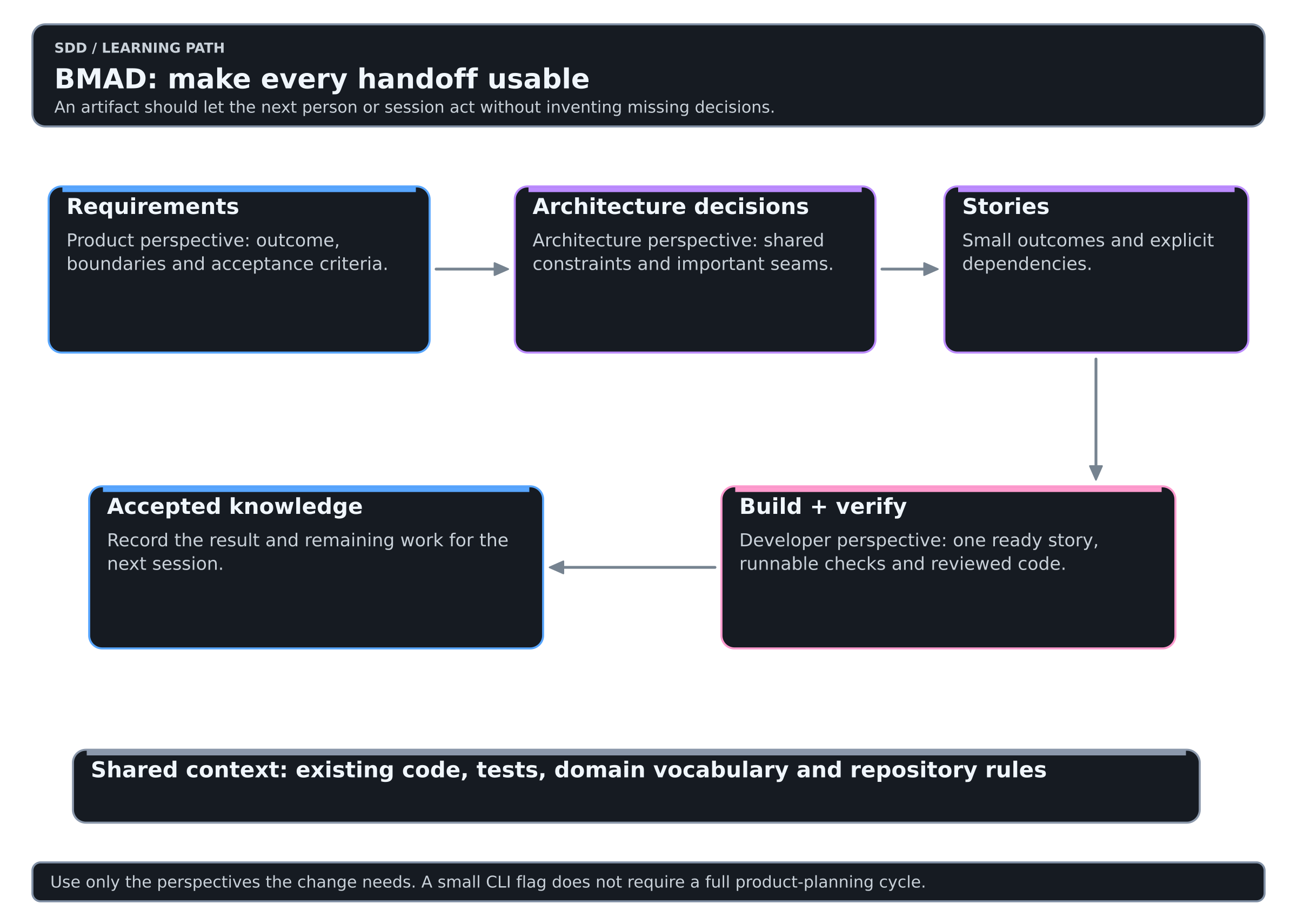
The current setup places shared runtime and configuration under _bmad/. Documents and tickets go to _bmad-output, with initiative-specific organization when an active initiative exists. Ask bmad status through the skill to report your actual configuration.
Keep the distinction between generated framework support files and your project knowledge. Review which planning documents, customizations and repository instructions the team should version. Follow the repository's existing ignore policy for caches and local state.
For an existing project, use bmad-project-context when the agent instructions are missing or stale. The brownfield guide explicitly allows skipping that step when maintained AGENTS.md, CLAUDE.md or equivalent rules already serve the purpose.
Common mistakes
| Instead of | Prefer |
|---|---|
| Running a full product process for a flag | One bounded Build request |
| Treating specialist personas as independent verification | Check the review mechanism and actual evidence |
| Letting a spec invent unresolved product decisions | Resolve intent before recording the contract |
| Starting a fresh chat with only “continue” | Give the exact spec or story reference |
| Mixing v6 commands with current skills | Follow the catalog installed in the repository |
| Creating more project context alongside good existing instructions | Maintain one coherent set of pointers and rules |
Updating
The current installation guide recommends asking the bmad skill to run bmad setup again. It checks versions and handles applicable updates and migrations. Review what it proposes, especially when migrating an older project layout. Reload the coding tool after its skill catalog changes.
Do not update the workflow in the middle of a comparison experiment. Record the versions at the start so a changed result is not mistaken for a changed model capability.
Practice on the shared lab
The BMAD Method lab route walks levels 2 to 6 of the SDD Learning with BMAD Method. It is the same small change every track uses: add JSON output to a tiny CLI and keep its text output unchanged.
A pragmatic adoption path
- Install only the skills needed for one real change.
- Use Build once before adopting the full planning catalog.
- Try a written spec when a change will span sessions.
- Add ticket decomposition only when independent slices are clear.
- Review whether the extra handoffs prevented rework or merely added documents.
My recommendation: choose BMAD when product definition, architecture and delivery coordination need a shared method. Its small-change path is a useful way to learn that method without adopting all of it at once.