SDD 03 - Matt Pocock Skills: Quick & Dirty Starter Guide
SDD Learning · Previous: Lab · Next: Matt Pocock Skills lab route
implement-spec, pr and retro into the engineering set that the Claude Code plugin ships, removes resolving-merge-conflicts, and renames the domain-doc convention from CONTEXT.md to GLOSSARY.md. A repository that still has a CONTEXT.md should git mv it: the skills only look for GLOSSARY.md now.Matt Pocock Skills are easiest to understand as a lightweight engineering operating system for coding agents. You choose the workflow; the agent can reach for reusable engineering disciplines such as TDD, debugging, domain modelling, research, architecture work and code review.
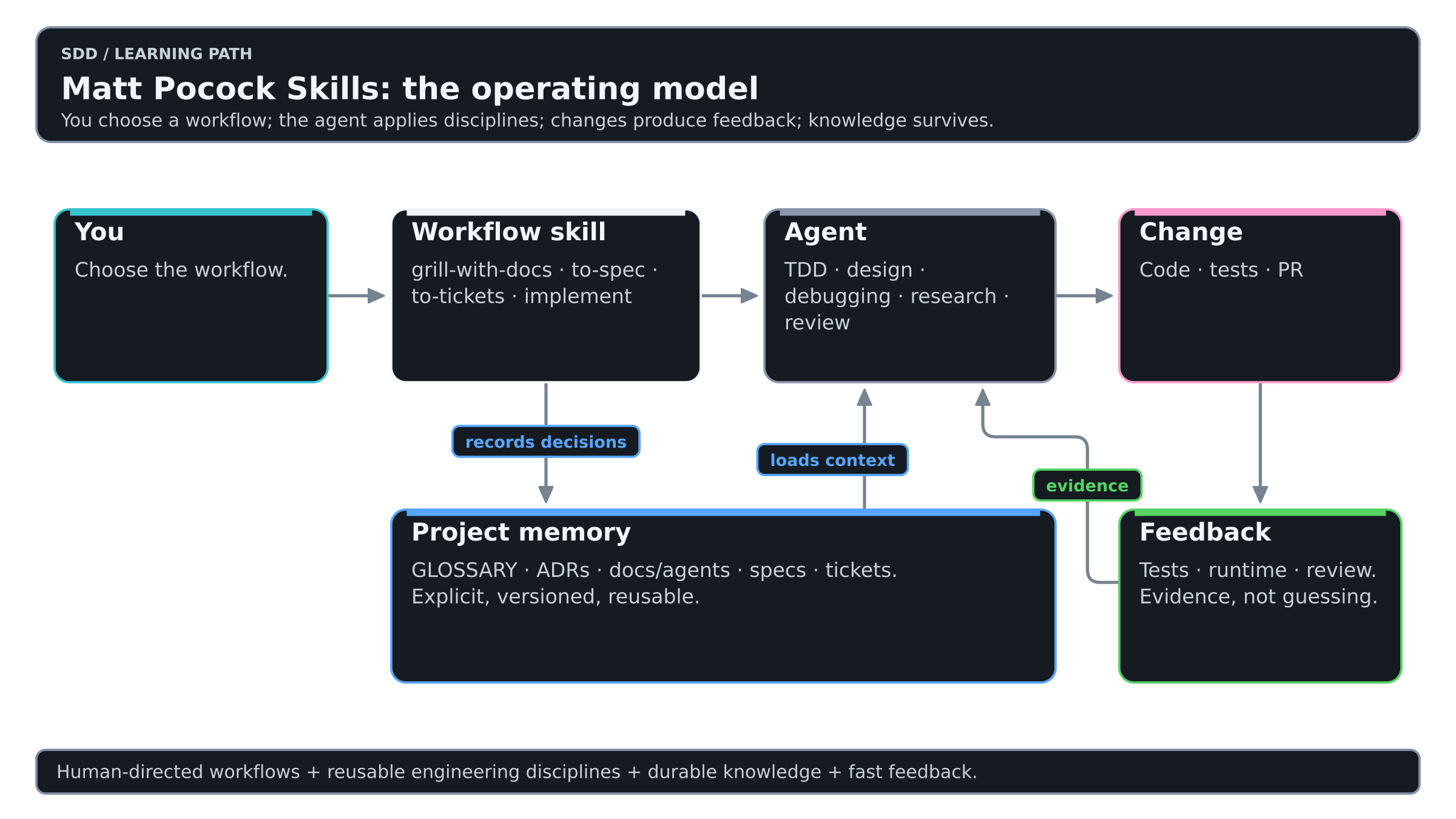
Colors mean the same thing in every diagram of this Learning: see the color key.
The architecture is composable. A workflow skill coordinates the job, engineering primitives provide reusable disciplines, repository-local documents carry context between sessions, and tests or reviews provide evidence back to the agent.
Quick start
For Claude Code, install the plugin:
$ claude plugins install mattpocock-skillsFor Codex and other compatible agents, use the skills installer:
$ npx skills@latest add mattpocock/skills
Pick one of the two: installing both leaves you with every skill twice. The plugin is a managed bundle that updates when a release ships; the installer copies editable skill files into your project.
Make sure setup-matt-pocock-skills is installed, then run it once in each repository:
/setup-matt-pocock-skills
Setup answers three repository-local questions: where issues live, which triage vocabulary the repository uses, and where domain documentation lives. It stores those answers under docs/agents/, so the same skills can work against GitHub, GitLab, local Markdown or another issue tracker without editing the skill files themselves.
The only four workflows you need at first
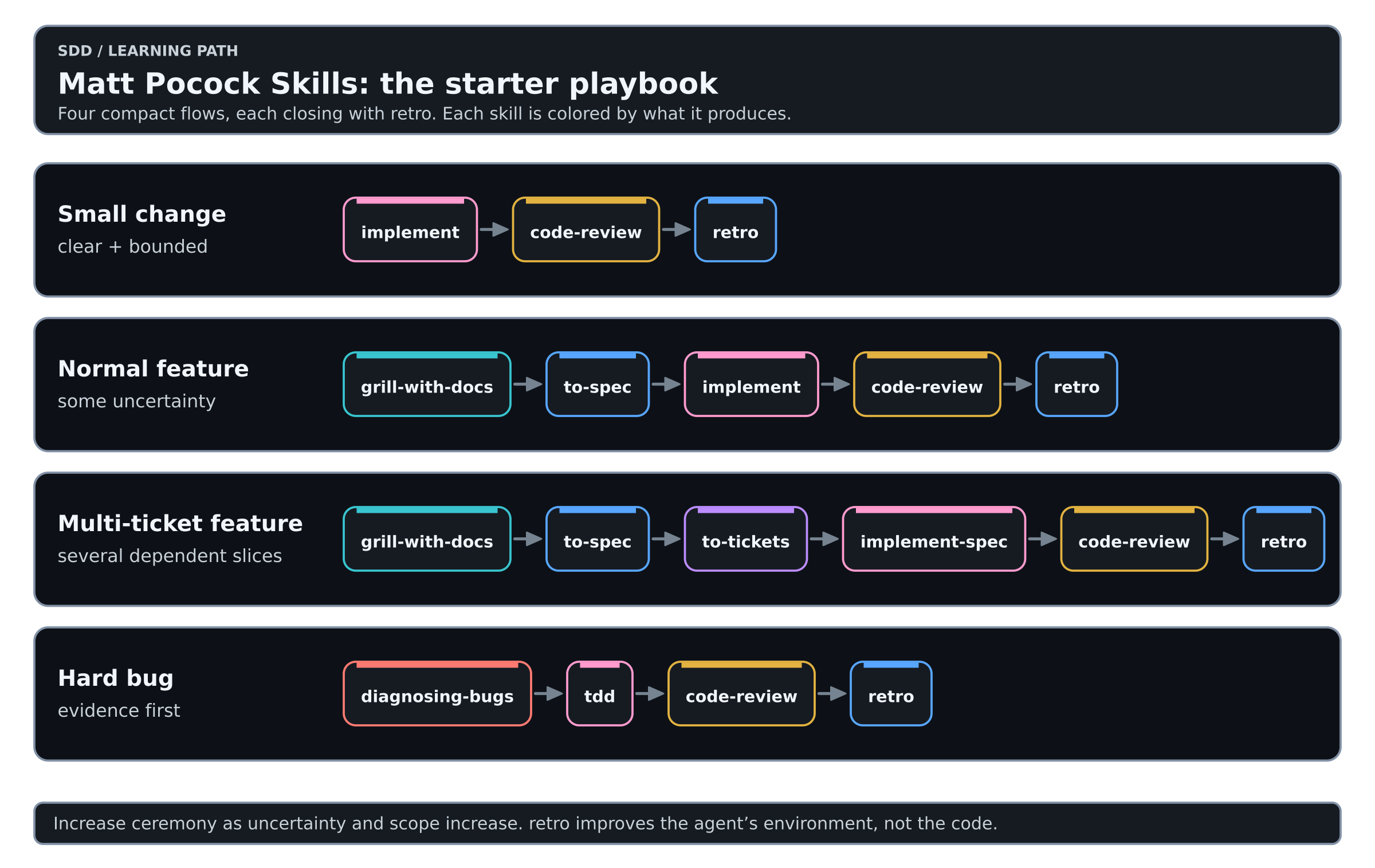
You do not need to run every skill for every change. Add process as uncertainty and scope grow.
For a small and obvious change, start with implement.
For a normal feature with unresolved assumptions, use grill-with-docs, then to-spec only if the decisions need to survive into later sessions, then implement.
For a larger feature that needs several independently useful slices, add to-tickets. If those tickets form a dependency graph large enough to benefit from multiple implementers, use implement-spec.
For a hard bug or performance regression, start with diagnosing-bugs, not with a request to "just fix it".
Every flow in the picture closes the same way. Since 1.3 the main flow has a last step after code-review: retro looks back over the session and suggests changes to the agent's environment, not to the code. Run it in the session it looks back on, before you clear the context.
Keep the grilling, the spec and the tickets in one unbroken context window, so that each builds on the same thinking. Each implement then starts fresh, working from its ticket.
How much process does the work deserve?
| Situation | Smallest useful flow |
|---|---|
| Decision is already clear and the work fits one context window | implement |
| Important assumptions are still unresolved | grill-with-docs -> implement |
| Decisions must survive across sessions | grill-with-docs -> to-spec -> implement |
| Several agent-sized vertical slices are needed | to-spec -> to-tickets -> implement |
| Tickets expose independent ready work | to-tickets -> implement-spec |
| Root cause is unknown | diagnosing-bugs |
| The whole initiative is larger than one planning horizon | wayfinder |
A useful threshold from the current to-spec documentation is the context-window boundary. If the work is already decided and comfortably fits one session, a spec can be unnecessary ceremony. If the work must survive several fresh sessions, the spec becomes the durable handoff.
Which skill should I use?
| Situation | Start with |
|---|---|
| I do not know exactly what we should build | grill-with-docs |
| We already decided; capture it as a durable spec | to-spec |
| The work needs several tracer-bullet slices | to-tickets |
| This is one bounded implementation task | implement |
| This is a dependency graph of tickets | implement-spec |
| I do not know which workflow fits | ask-matt |
| The bug is confusing or intermittent | diagnosing-bugs |
| Several technical approaches need experimental validation | prototype |
| I need primary-source technical research | research |
| The architecture is becoming hard to change | improve-codebase-architecture |
| The initiative is too large for one context window | wayfinder |
| Implementation is complete | code-review |
| The reviewed work needs a useful PR description | pr |
| We should improve the agent environment after this work | retro |
User-invoked workflows vs engineering primitives
User-invoked skills are orchestration. You normally choose them explicitly: ask-matt, grill-with-docs, triage, improve-codebase-architecture, setup-matt-pocock-skills, to-spec, to-tickets, implement, implement-spec, wayfinder, and retro.
Model-invoked skills are reusable engineering disciplines. The agent can reach for them when the task fits: prototype, diagnosing-bugs, research, tdd, domain-modeling, codebase-design, code-review, pr, and wizard.
You choose the engineering workflow, and the agent chooses the techniques inside it.
What good output looks like at each stage
Use this table to check whether a workflow is working or only producing more text.
| Stage | Good output |
|---|---|
grill-with-docs | Ambiguities are resolved, vocabulary is sharpened, important decisions are captured in the glossary or ADRs |
to-spec | A decision record that says what must be true, the chosen seams, testing decisions and explicit out-of-scope items |
to-tickets | Small vertical tracer bullets with acceptance criteria and blocking relationships |
implement | One decided piece of work implemented with a tight TDD loop, reviewed with code-review and committed to the current branch |
implement-spec | The whole ticket graph integrated on one branch, with ready tickets parallelized only where dependencies permit |
code-review | Separate Standards and Spec findings against a known fixed point |
retro | Concrete improvements to navigation, checks, standards, steering files or tooling for the next session |
First real feature
Imagine the request is: add configurable per-customer API rate limits.
Do not begin with "implement customer rate limiting" unless the semantics are already obvious. Start with:
/grill-with-docs

We need configurable per-customer API rate limits.
The useful questions are architectural: what exactly is a customer, whether limits are per account or API key, how bursts behave, whether counters are distributed, what happens during datastore failure, and which terms belong in the project glossary.
grill-with-docs is deliberately small as an orchestrator: it combines the reusable grilling and domain-modeling disciplines so the interview sharpens both the plan and the project's language.
When the decisions are made and the work needs to survive across sessions, capture them:
/to-spec
to-spec is a decision record, not another interview. It synthesizes what has already been decided, uses the repository's domain vocabulary, records testing seams and avoids brittle implementation details that can become stale quickly.
If the feature needs several vertical slices, decompose it:
/to-tickets
Prefer tracer-bullet tickets that prove behavior end-to-end. Avoid tickets such as "database", "backend", "API" and "tests" that merely split the codebase into layers.
For one bounded ticket:
/implement
For the whole dependency graph:
/implement-spec
Why tracer-bullet tickets matter
to-tickets does not treat tickets as a conventional project-management checklist. Each ticket should be a narrow but complete vertical slice that can be verified on its own and sized for a fresh agent context.
Bad decomposition usually looks like this:
Ticket 1: database
Ticket 2: backend
Ticket 3: API
Ticket 4: tests
Nothing is proven until the final layer lands, so each ticket depends semantically on unfinished work elsewhere.
A better decomposition looks like this:
Ticket A: enforce one default customer limit end-to-end
Ticket B: add per-customer override behavior end-to-end
Ticket C: expose limit status and rejection metadata end-to-end
Each slice can own its tests, implementation and acceptance criteria.
Parallelism should come from the task graph
implement-spec treats tickets as a dependency graph with blocking edges rather than as a sequential list. The currently unblocked tickets form a ready frontier. Independent tickets on that frontier can be implemented in separate worktrees and merged back into one integration branch.
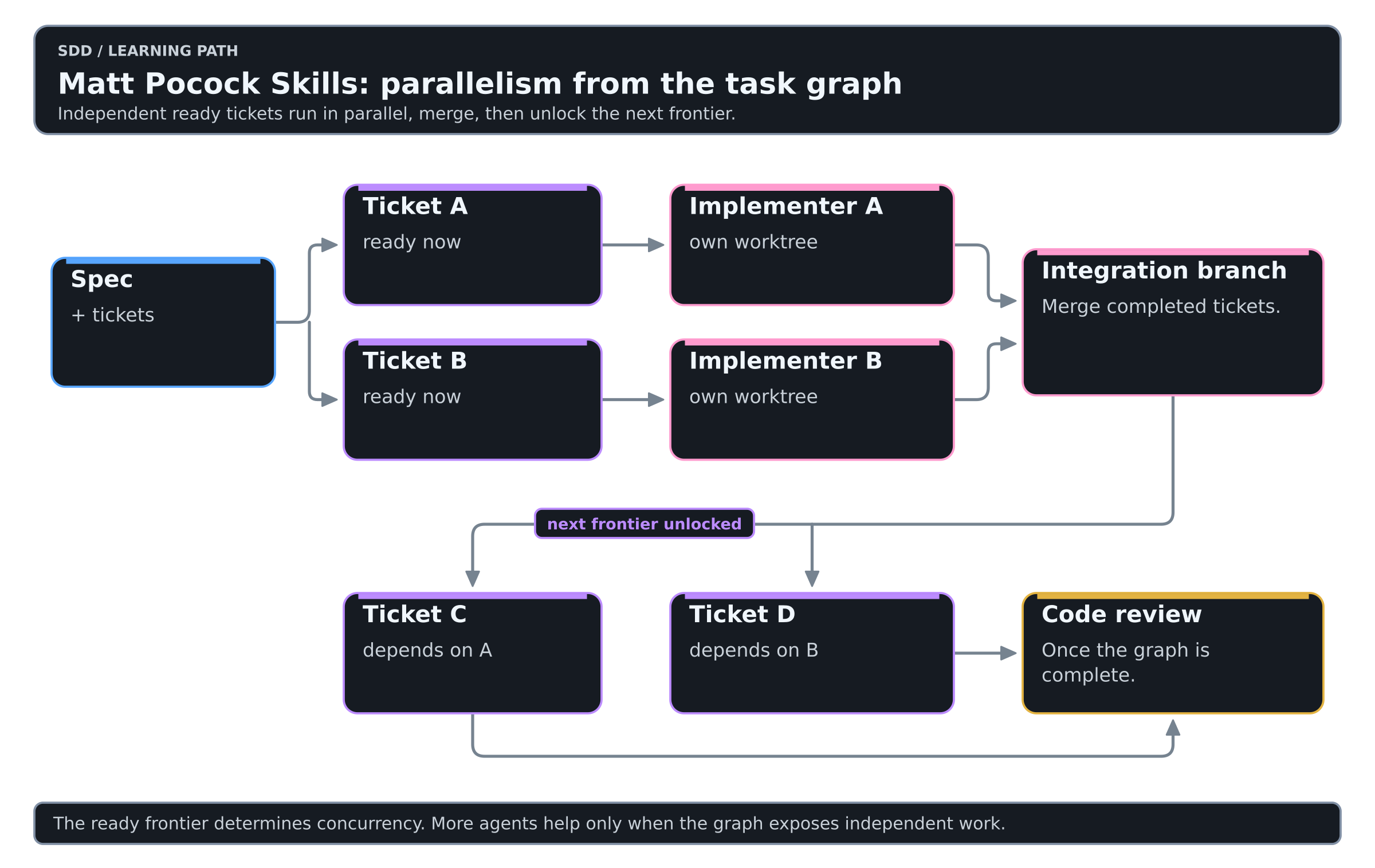
This is a much stronger multi-agent pattern than choosing an arbitrary number of agents and hoping their work does not collide.
In 1.3 the goal of a run is the integration branch, not a pull request: a draft PR opens only when the issue tracker closes work through PRs or you ask for one. Each implementer builds its ticket with tdd in its own worktree, and one code-review runs over the integration branch at the end.
Parallel agents therefore need good decomposition and clean module seams. If every ticket modifies the same central files, the task graph may say the work is logically independent while the codebase still makes it operationally coupled.
Bugs: evidence before edits
The debugging discipline is roughly:
reproduce -> minimise -> hypothesise -> instrument -> fix -> regression test
The agent must build a feedback loop that goes red on the bug before it starts patching. Debugging then becomes a sequence of experiments instead of repeated guessing.
Use:
/diagnosing-bugs
Then let tdd and code-review close the loop around the fix. Once the fix is in, retro is the place to ask what would have prevented the bug.
A warning sign is an agent editing several files before it can reliably reproduce the failure: that is patching without a hypothesis.
TDD drives the implementation
The repository treats TDD as a fast feedback mechanism, not as a phase where the agent writes a large test suite first.
RED -> GREEN -> REFACTOR -> next vertical slice
The useful unit is one behavior at a time. That keeps the agent close to evidence, limits the amount of unverified code it can accumulate and makes failures easier to localize.
The same idea explains why to-spec records testing seams and why codebase-design favors deep modules with small, testable interfaces. Planning, architecture and TDD are supposed to line up around the same seams.
Persistent project memory
A strong workflow keeps moving important information out of the chat and into durable artifacts: GLOSSARY.md, ADRs, docs/agents/, issue tracker specs, tickets and committed code.
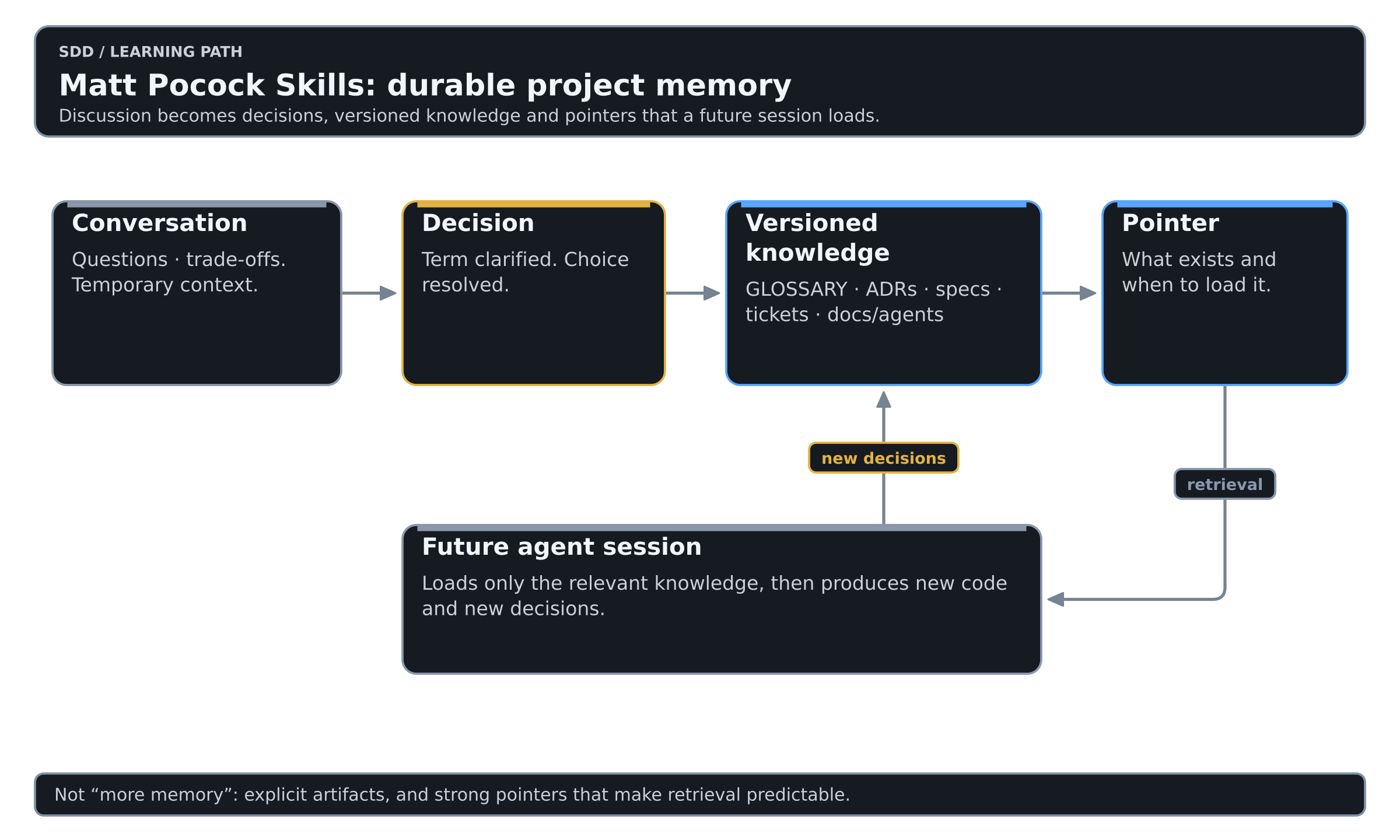
This is more reliable than hoping the model "remembers the project": the important concepts are written down and can be reviewed.
The complementary idea from writing-for-agents is the context pointer: a small reference that tells the agent both what information exists and when it should retrieve it. A perfect document behind a weak pointer is still unreliable because the agent may never load it.
So keep durable knowledge outside the always-loaded prompt, and make the pointer to it precise enough that retrieval is predictable.
Code review asks two independent questions
Matt Pocock's code-review is not a generic "find bugs" pass. It compares a diff against a fixed point and reviews it along two independent axes. You name the fixed point: a commit, a branch, a tag. If you do not, the skill asks for one rather than guessing.
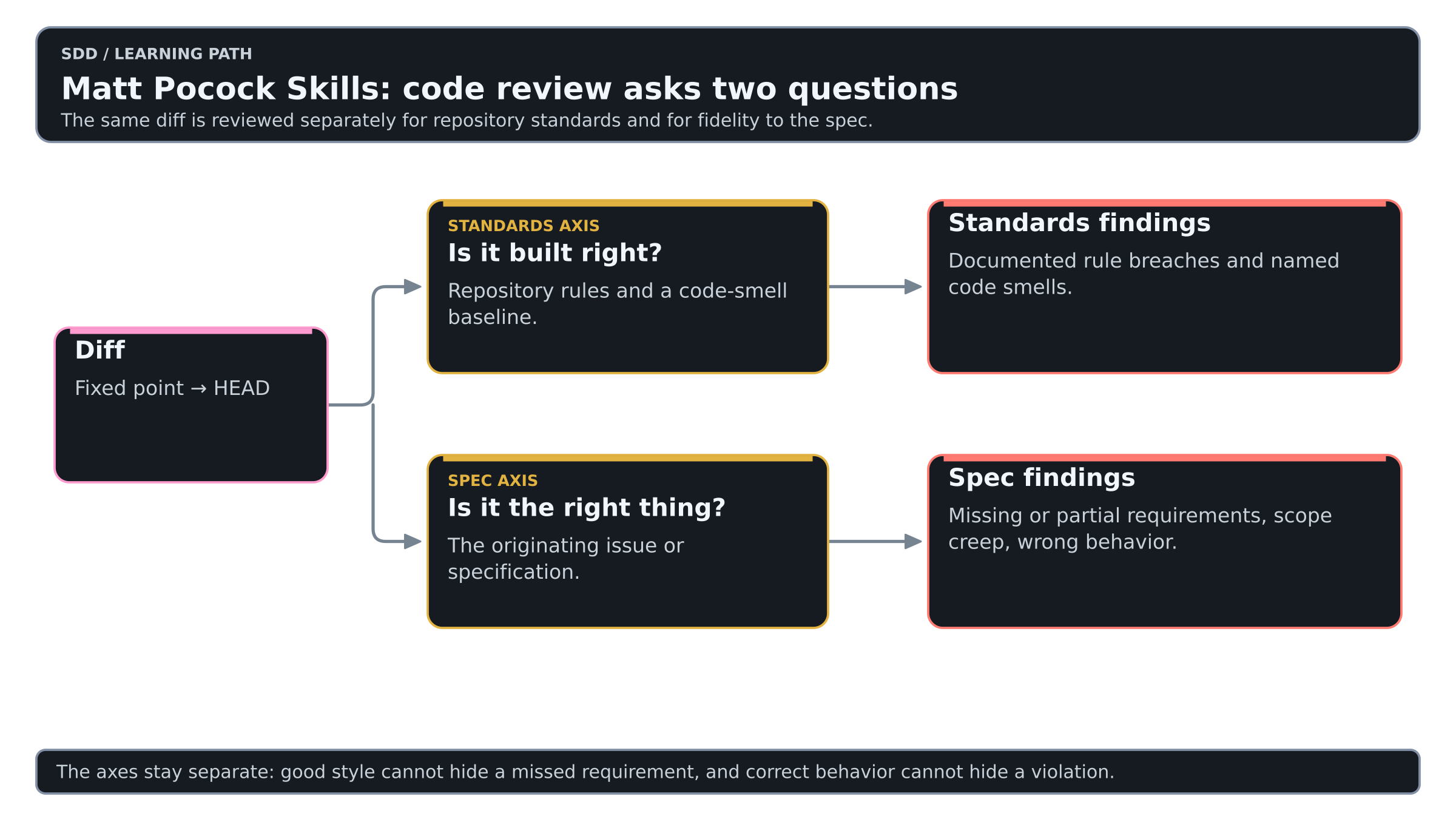
The Standards axis asks: is it built right? It reads the repository's documented coding standards and uses a code-smell baseline where local rules are silent.
The Spec axis asks: is it the right thing? It checks the change against the originating issue or specification.
The two analyses run separately so one line of reasoning does not contaminate the other. The result is not collapsed into one verdict, because a change can be well written and still implement the wrong requirement, or satisfy the requirement while violating important repository conventions.
/code-review of its own, which hunts bugs in a diff and is a different thing. Upstream names this clash as the most reported problem with the skill. Installed through the plugin, this one is mattpocock-skills:code-review; installed with npx skills, the local file takes the unqualified name. Check which of the two your agent is running.Why deep modules matter more with coding agents
Coding agents can generate code much faster than humans can absorb the resulting complexity. That makes architectural depth more important.
A shallow module exposes a large interface while hiding little complexity. A deep module exposes a small interface while hiding substantial internal complexity behind a stable seam.
codebase-design pushes toward deep modules because they give agents three advantages: a smaller context surface, clearer ownership boundaries and a high-level interface that can be tested without binding tests to implementation details.
That is also why multi-agent execution tends to work better in codebases with strong seams.
What to learn first
Start with this small set:
setup-matt-pocock-skillsask-mattgrill-with-docsto-specto-ticketsimplementimplement-specdiagnosing-bugscode-reviewretro
Add the deeper primitives later:
domain-modelingcodebase-designprototyperesearchwayfinderprtriage- direct use of
tdd writing-for-agentswhen authoring your own agent-facing documentation or skills
A pragmatic adoption path
Do not try to redesign your whole development process on day one.
- Run
setup-matt-pocock-skillsin one active repository and inspect the files it creates underdocs/agents/. - Use
implementfor a few small, already-decided changes so you learn the execution behavior without introducing planning overhead. - Use
grill-with-docson one feature where terminology or requirements are ambiguous. - Use
to-speconly when that feature needs to survive into another session. - Use
to-ticketsonly when the work no longer fits cleanly into one agent-sized slice. - Try
implement-specafter you have a real dependency graph; do not manufacture parallelism just to exercise it. - Run
retroafter a meaningful session and accept only improvements that make the next run more reliable or easier to navigate.
The goal is an engineering loop that is explicit, inspectable and backed by evidence. Invoking more skills is not a goal.
Common mistakes
| Instead of | Prefer |
|---|---|
| Giving a vague large feature directly to an implementation agent | grill-with-docs then to-spec when a durable record is needed |
| Writing a spec for every tiny task | Skip directly to implement when the decision is clear and the work fits one context |
| Splitting tickets into database, backend, frontend and tests | Vertical tracer-bullet tickets |
| Launching many agents arbitrarily | Let ticket dependencies determine concurrency |
| Guessing at bug causes | diagnosing-bugs and an explicit feedback loop |
| Writing all tests before all implementation | Small Red -> Green -> Refactor slices |
| Keeping domain knowledge only in conversation history | GLOSSARY.md, ADRs and tracker artifacts |
| Feeding every document into every prompt | Strong context pointers and retrieval |
| Treating code review as one generic score | Keep Standards and Spec as separate questions |
| Finishing a session without improving the environment | retro |
The architecture in one sentence
The collection keeps four things separate: workflows directed by a human, reusable engineering disciplines, persistent project knowledge and fast feedback loops that produce evidence.
grill-with-docs -> to-spec -> implement for a normal feature that needs a durable record, grill-with-docs -> to-spec -> to-tickets -> implement-spec for a larger initiative, and diagnosing-bugs -> tdd -> code-review for a hard bug.Practice on the shared lab
The Matt Pocock Skills lab route walks levels 2 to 6 of the SDD Learning with Matt Pocock Skills. It is the same small change every track uses: add JSON output to a tiny CLI and keep its text output unchanged.
Interesting links and videos
- Matt Pocock on YouTube - Matt's main YouTube channel; useful for the broader AI coding and agent-engineering material around the skills.
- AI Hero - Skills - the best current visual catalog of the skill system, grouped by main flow, shaping, upkeep, productivity and reference skills.
- AI Hero - Videos - searchable video index with skill walkthroughs and related AI-engineering material.
- 5 Agent Skills I Use Every Day - a good practical overview of the workflow mindset around grilling, specs, tickets, TDD and architecture.
- grill-with-docs: Align Before You Build - detailed explanation of when to use
grill-with-docs, how it writesGLOSSARY.mdand ADRs, and where it fits beforeto-spec. - 9 Things People Get Wrong With /grill-me and /grill-with-docs - useful once you start using grilling seriously; covers scope, context limits, prototyping handoffs and preserving decisions.
- My Skill Makes Claude Code GREAT At TDD - focused walkthrough of the TDD skill and the Red -> Green -> Refactor feedback loop.
- Essential AI Coding Feedback Loops for TypeScript Projects - practical companion material on type checking, tests, pre-commit checks and giving coding agents fast evidence.
- Matt Pocock Skills on GitHub - canonical source, skill definitions, documentation, changelog and issues.
- GitHub Releases - what changed in each release; this guide follows v1.3.1.
A simple learning path is: watch the "5 Agent Skills" overview -> read the AI Hero Skills catalog -> try one real feature with grill-with-docs -> to-spec -> implement -> return to the individual skill pages when something feels unclear.